
With all the discussion of new Adobe CS4 betas, the release of Acrobat 9 and Acrobat.com, you would think this would be enough. Well guess what, John Nack has posted an article on his blog covering the new Photoshop UI (user interface).
While not a drastic change, especially to Windows users, the move to a "single-window" interface may come to a shock to Mac users. We've been free of this constraint since day one.
Photoshop CS4 will sport an "application frame" – a window which contains both the interface elements such as toolbars, palettes and other clickable interface elements, as well as the document itself. You can click the image below to see a larger version of what I'm talking about.
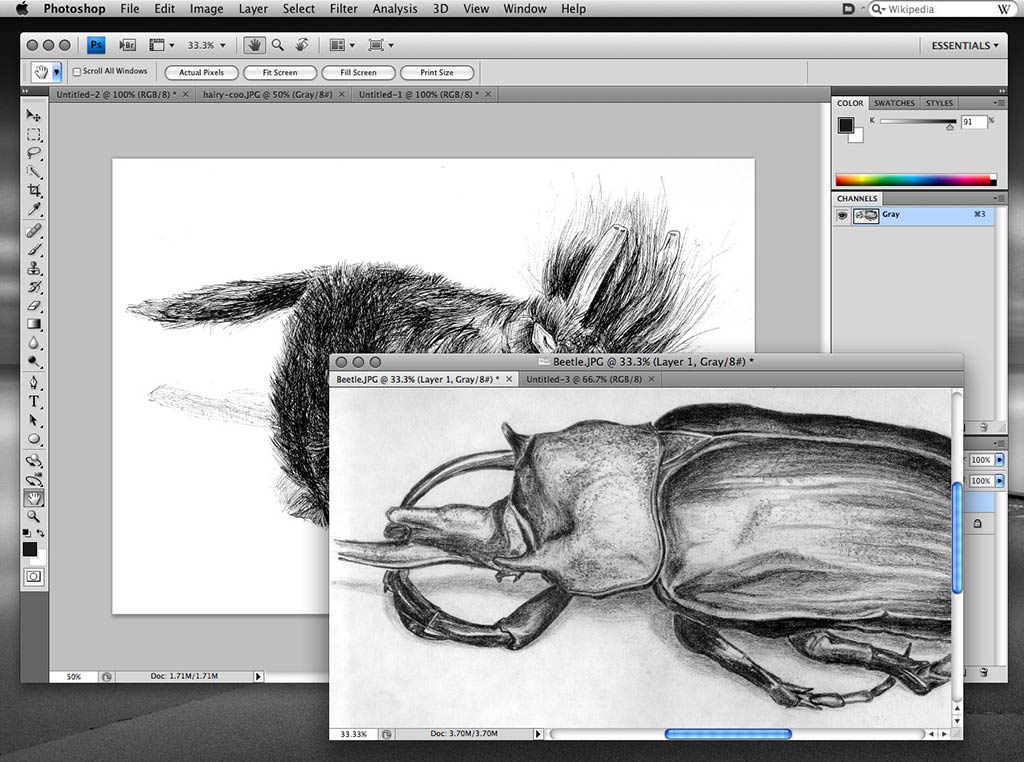
Current Photoshop CS3 users can begin to get the idea now when they use the Maximized Screen Mode (hit the F key to switch to it), though it's still not the same. I'm not sure if I like the idea or not, but thankfully it appears that Adobe will make this an optional UI method, rather than the only option.
Also mentioned in the article is a very welcome addition, tabbed windows. If you use tabs in your browser rather than having multiple windows open, you'll love it in Photoshop. A split-screen view is also in the works to give you the ability to view more than one image side-by-side.





new PS interface
Fri, 06/06/2008 - 11:18 — Shoaf (not verified)I saw that article this morning. I, too have had some very serious misgivings about the "app frame", as that's one of several things I absolutely loathe about Windows. (OTOH, one of the commenters on Nack's article feels the exact opposite, so YMMV.) I think Nack has put some of my fears to rest, and I'll certainly reserve final judgment until I've used the retail version of the new Ps for at least a few days.
That said, I do find myself frequently using full-screen mode in Ps... so maybe this WILL be a good thing?
I also welcome the idea of tabs, as well as being able to have multiple panels open simultaneously.
It's very interesting how the Adobe engineers have to weigh out the different aspects of UI. In order to make the best user experience, there are things that need to be kept consistent with the rest of the OS, yet there are times when breaking these conventions might make the best solution. Complicate this with users who have used Ps for years compared to new users that are more used to Mac OS X than Adobe software. (Think of command-H to hide most apps on Mac OS X, but it hides the "marching ants" selection in Ps, and has done so for many years. Which behavior is more "correct"?)
Sweet fancy Moses...
Fri, 06/06/2008 - 12:43 — PeteDidn't we just get CS3? For an application that has few flaws they sure upgrade a lot.
Work With Pete!
Adobe's upgrade cycle
Fri, 06/06/2008 - 13:21 — JamesAdobe updates the major apps (Creative Suite) every 18 months, with Acrobat not counting (they consider Acrobat it's own "entity"). CS3 has been out for quite a while now, so I suspect we might see CS4 later this year. But then again, who knows. A lot probably depends on what comes to light during WWDC.
Seems to me...
Fri, 06/06/2008 - 13:58 — PeteThey should probably slow down with the upgrades for certain apps - namely PS and Illustrator. I'd venture to say people aren't breaking down Adobe's doors looking for upgrades & new features for those two. Bug fixes, maybe, but not new features. Especially features that change the entire interface that we're all used to working in.
I'm sure it's got more to do with money than anything else, though. Sigh...
Work With Pete!
Oy
Fri, 06/06/2008 - 20:33 — Luke (not verified)Dear Adobe:
Please rip off the Aperture 2 interface, since you clearly don't know how to do an all-in-one app window. Thank you.
This is Photoshop CS4? There are so many issues with the UI and so many open areas of the window that are not being utilized, such as the double-decker title bar area that should be somehow joined into one. Adobe just can't do UI, I'm convinced of that. Stop making custom arrows and sliders and crap like that, it's not doing anything to enhance the product and only seems to be slowing things down. In fact, while you're at it, you need to completely rebuild your key apps instead of piling on more and more features onto an archaic frame and pushing it out for full price, if not more, each year or year and a half anymore.
Double Ewe Tee Eff
Sat, 06/07/2008 - 12:23 — Vahn (not verified)This is probably one of the stupidest choices Adobe could have made. I hated the application frame when I had a PC and I hate it now. I truely hope it's just an UI option.
It's an option
Sat, 06/07/2008 - 22:01 — JamesThe article clearly states that it will be an option - so we won't be forced to use it.
Thank god
Sun, 06/08/2008 - 08:20 — Danat least they had the brains to make it an option
People come out of the
Mon, 06/09/2008 - 08:20 — Phos....People come out of the woodwork at the advent of every new release and bawl about changes in Photoshop that they haven't even tried yet. Then there are even more people who whine about changes 20 minutes after they've installed the latest version.
I've been using Photoshop since version 2.5.1, and I get a little antsy about changes as well. But within a week of using the new version I often forget the differences between the new and the old. If somebody asks me a question (online or in meatspace) about something that is specific to an older version, I have to open the older release and refresh my memory.
By the time the new version comes out, there's no amount of whining anyone can do that will change things, so it's best just to get used to it and continue working.
Taking this software Luddism to the extreme, I still occasionally see people who begrudge Adobe for introducing the concept of layers, fer crapssakes!
As for me, I champion the addition of new whiz-bang features and being able to tailor one's working environment and experience to one's liking, and to have lots of options. And yes, I'd like to see some attention paid to some of the "lesser" features which would make my day-to-day chores a little easier, but like most, the only thing I really care about is that Photoshop works fast and is reasoanably bug-free.
So I say: Go ahead Adobe, modernize the UI, offer more options and all the other stuff. I'll get used to it quickly enough, and will probably find new features that I'll soon wonder how I ever lived without. I'll only start yelling after I've given the newest version a fair shake.
I agree Phos
Mon, 06/09/2008 - 09:25 — JamesThere were a lot of feature introduced in Photoshop CS3 that SOUNDED iffy when they were announced. But upon actually using them, I found them quite handy - or at the very least, I got used to them (keyboard shortcut changes come to mind).
This UI thing isn't a CHANGE, it's an OPTION. And like you, as long as it doesn't crash Photoshop when I'm using it, I say bring it on.
laught out loud
Fri, 07/11/2008 - 03:25 — Visitor (not verified)You mac users make me laught.
I'm talking here about the "single-window" interface...
well, great place here anyway...
I've been using CS4 since
Mon, 03/09/2009 - 15:49 — Josh - Tucson Web Designer (not verified)I've been using CS4 since December, and generally speaking I like the updated interface changes. But they could make some changes in CS5 like completely ditching the toolbar on the very top (for os x users). For me, this just takes up too much space, and its really not something I find necessary for my work flow. For Windows users, its no big deal because it's integrated with the menu bar and doesn't take up any space.
Post new comment