If you haven't looked in your Mac OS X Dock preferences since upgrading to Snow Leopard, you may have missed a handy little preference that will save you space in your Dock when you minimize windows. Neat-freaks read on...
OSX
Minimize windows into app icon
Submitted by James on Wed, 11/11/2009 - 11:23Pantone Turns iPhone into Color Studio on the Go
Submitted by James on Mon, 10/26/2009 - 11:12 myPANTONE, an iPhone application, offers graphic, digital, multimedia, fashion, interior and industrial designers the freedom to capture, create and share PANTONE Color Palettes – wherever they go and whenever they find inspiration.
With myPANTONE, designers have access to all the PANTONE Color Libraries, including the PANTONE MATCHING SYSTEM for coated, uncoated and matte stock; the PANTONE Goe System for coated and uncoated stock; PANTONE PASTELS for coated and uncoated stock; and the PANTONE FASHION + HOME SMART Color System. The application also enables designers to easily create harmonious color palettes by finding complementary, analogous and triadic combinations for selected colors.
myPANTONE takes advantage of the iPhone’s built-in camera to let designers capture whatever inspires them – from architecture and street scenes to fashion and nature. Colors can be extracted from any photo on the iPhone and then matched to the closest PANTONE Colors.
Color palettes can be emailed to colleagues and clients as color patches, or as application-ready swatch files for use in design applications including Adobe Creative Suite (.ase), CorelDraw and QuarkXPress.
You can purchase the myPANTONE application for $9.99 from Apple's iPhone App Store, for use on the iPhone or iPod Touch.
Remove extension change warning dialog in OS X
Submitted by James on Wed, 10/21/2009 - 11:42One of the few annoying things about past versions of Mac OS X was the warning the OS tossed up every time you changed the extension on a file. I often times changed a .txt extension to .html, or added an extension to a file that didn't have one. Boom - annoying warning message.

Thankfully, Apple has given us the option of turning these warning messages off via the Finder's Preferences in Snow Leopard. Simply go to the menu bar and choose Finder>Preferences and un-check the Show warning before changing an extension option.
View detailed WiFi settings in Snow Leopard's Airport menu
Submitted by James on Thu, 09/24/2009 - 05:07I mentioned a new feature of OS X 10.6 Snow Leopard earlier this week, and today I have another one for you that enhances the Airport menu.
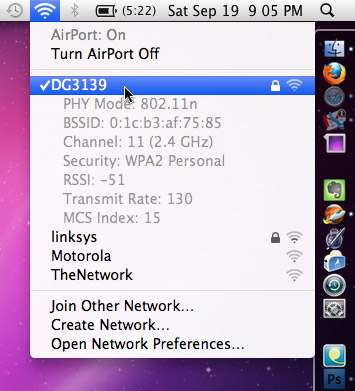
Hold down the Option key while clicking the Airport icon in your menubar to view detailed statistics about the network you're currently connected to, such as the Channel, Security Settings and more.
While this probably holds little value for the average user, it can be quite valuable for network admins and people who just love to know everything about what's going on with their Mac at every moment.
View invisible files in Snow Leopard open/save dialog boxes
Submitted by James on Tue, 09/22/2009 - 11:16Snow Leopard (Mac OS X 10.6) brought many refinements to the operating system that aren't immediately apparent to most users. A lot of tinkering around reveals some very cool additions. One of those hidden features is the ability to view invisible files in Open/Save dialog boxes.

When you're in an Open or Save dialog box, simply hit Command + Shift + . (period key) and all the invisible files and folders on your drive will appear in the dialog box, as seen in the screenshot above.
This is a temporary activation, so the next time you visit an Open or Save dialog box, the invisible files will be hidden again.
Quick Look in Open, Save and Place dialog boxes
Submitted by James on Fri, 09/11/2009 - 06:19 If you've updated to Snow Leopard, you may be interested to know that you can use Quick Look in Open and Save dialog boxes; just select the image you wish to view and hit the Spacebar.
Of particular interest to designers, this tip also works in the Place dialog box in all the Adobe Creative Suite applications. This means you can now get a better/larger preview of the image(s) you're going to place in your document.
If you're still running a G5 Mac, you can't upgrade to Snow Leopard, but you can get this feature using Default Folder X - my all-time favorite piece of shareware!
Using Time Capsule as a media drive
Submitted by James on Wed, 08/19/2009 - 04:06 Apple's Time Capsule can make an excellent media drive to house your movies, photos and music. David Appleyard over at TheAppleBlog provides an excellent guide that will take you step-by-step through the process of turning your Time Capsule into a media drive and explain what works well and what simply won’t. As someone who recently purchased a Time Capsule for this very reason, I found the article to be quite helpful.
Free icons: HeadsUp - Apple
Submitted by James on Wed, 08/05/2009 - 12:28
I'm a huge fan of Adobe's CreativeSuite icons. I like their simplicity, they just stand out in the dock. I've customized a few of my icons to take on a similar look, which I call HeadsUp.
So here's the HeadsUp - Apple icon set, containing 7 color variations (plus a Graphic Mac logo version). The icons are 512 pixels and should scale well for virtually any resolution screen. Free of charge, don't steal, blah, blah, blah...
Candybar users can download the iContainer version here.
– Or –
You can grab the standard OSX folder version here.
Snow Leopard to see many minor tweaks
Submitted by James on Thu, 07/30/2009 - 04:36 While PC users sweat, complain and ponder which over-priced version of Windows 7 they’ll be forced into buying to fix everything wrong with Vista, most Mac users are likely licking their chops at what Snow Leopard will bring, and how little it will cost.
I'm pretty excited about the update, but oddly enough, it's the little things that are getting fine-tuned that interest me the most. I've covered them in my article at TheAppleBlog titled Snow Leopard, Finely Tuned. As designers, the one thing that will impact us the most is probably going to be the Gamma default change to 2.2 from 1.8.
OSX Snow Leopard desktop pictures
Submitted by James on Tue, 07/28/2009 - 04:44
UneasySilence reports to have all 35 of the OSX Snow Leopard desktop pictures in full 2560x1600 resolution available for download. Grab 'em while they're hot!