
Several months back, I signed up to be notified of a spectacular new image editor built especially for OSX. This app called Iris, was to be fast, sleek and easy to use. It was a long time ago, and I hadn't heard anything about it since, so I figured it was yet another one of those vaporware apps.
I received an email yesterday refreshing my memory, and quickly downloaded Iris 1.0 and fired it up. Iris runs on Mac OSX Leopard Intel and PowerPC-based Macs. My test machine is a MacPro with 3GB RAM running 10.5.3.
I was distracted by the fact that it has a cool icon, so I didn't really pay attention to the fact that upon launching Iris, you're forced to either create a new document or open an existing one. There's no way to close the New Document dialog window - because if you try, the program quits. No matter. I was ready to open my 35MB test image anyway.
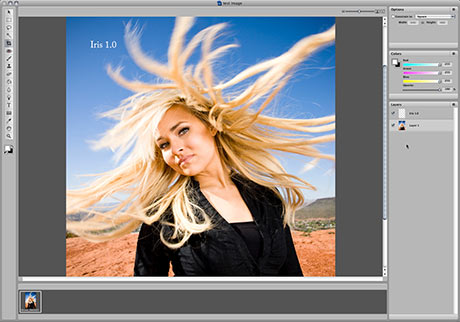
Iris opened the image rather quickly, and the single window GUI I was presented with was very pleasing to the eye.
That's where the good stuff ends.
Doing ANYTHING in Iris was painfully slow. I mean really slow. So much so that I actually closed the document and checked the size of the image to make sure it wasn't really 135MB instead of only 35MB.
One of the first things I usually check with any application is the type capability. Iris allows you to set type in your document, but apparently you must set your font and size BEFORE you enter your text, because once I entered the text, there was no way I could find to go back and edit it. Heck, I couldn't even select it. I hope 128 points is large enough for your type, because that's as large as the slider will allow you to make text. You can manually enter a number like 250 points, but then when I went to actually set the text in the document, the text was "constrained" inside some invisible box - placing around 4 characters on each line. And again, I couldn't select the text once I left the text editing mode (or hitting Enter) to go back and fix it.
All the required color adjustment tools are there, I just had a really difficult time using them - mostly because it took so long to do it. For instance; I tried adjusting the levels on my test image, but upon clicking the slider, Iris seemed to go into a deep sleep. About 6 to 8 seconds passed by before it mistakenly moved the wrong end of the slider to begin with. Rather than wait to fix it, I force quit the app.
At this point I restarted my Mac, thinking maybe I just had a whole bunch of junk in my trunk, so to speak. After restarting, I fired up Iris again. Unfortunately, it was simply more of the same.
At this point, I had already lost interest, so I decided to go back to the Web site and just check out what some of the features were supposed to be. I was expecting a smattering of lists a mile long such as I was used to seeing on the Pixelmator site. Unfortunately, the sparse single page dedicated to Iris offers little in the way of a feature list beyond three useless screenshots.
If you're looking for a single-window, affordable and fast image editor, I suggest you skip Iris and look at a more mature app like Acorn. Perhaps with age, Iris will improve to be a useable app.





Zzzzzzz!
Fri, 06/20/2008 - 05:09 — Robert (not verified)I fell asleep waiting for this app to do almost everything. I thought you were being a bit harsh in your review, but I would say you were spot-on.
Zzzzzzzzzz 2 the mission!
Sun, 06/29/2008 - 15:58 — Antoine Boku (not verified)yes my friends, needing a Buddhist patience to work at Iris ... that makes me test it was the interface of a single window for everything. Last week I discovered another application that displays the same interface: CS4 Photoshop!
I am working on it since then and enjoyed the improvements in performance: faster,
more productive and more beautiful. Well better than the CS3 despite some bugs in the interface of the beta, the final product should be very good!
Cheers
Post new comment