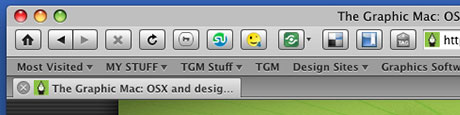
 With Firefox 3 in the final stages of beta, I’ve been looking at what extensions I use and whether or not I wish to continue using them. Since most extensions don’t work in the beta version of Firefox without the use of Nightly Tester Tools, I’ve been living without most of them for a while. Below is a list of extensions I consider must-have. All the extensions I’ve listed either work already with Firefox 3rc1, or work with Nightly Tester Tools forcing them to work. By the way, the appearance in the screenshot above is courtesy of the GrApple Delicious Theme. 1Password 2.6.1 (commercial product) Password manager & form filler for Mac OSX. Adblock Plus 0.7.5.4 Ads were yesterday. Block specific ads or all of them. BBCodeXtra 0.2.5.6 Adds BBCode/HTML/XHTML code commands to the contextual menu. Great for formatting HTML quickly. Color Management 0.3 Enables customization of Firefox 3’s color management and other related options. Copy as HTML Link 1.1 Creates an HTML link to the current page using the selected text and copies it to your clipboard. Delicious Bookmarks 2.0.48 Access your Del.icio.us bookmarks wherever you go and keep them organized. Once you install it, run an update to get the latest version. Fission 0.9.7.1 Puts the progress bar in the address bar (Safari style). Image Zoom 0.3.1 Adds zoom functionality to images found on Web pages. Nightly Tester Tools 2.0.2 Forces all your extensions to work with the latest version of Firefox, among other features. Resizeable Textarea 0.1d Resize text areas for a complete view of your text input. Screen grab! 0.94 Saves an entire Web page as an image, even the part you can’t see. Shareaholic 1.4 Share links using the most popular social bookmarking sites at the click of a button. Smiley Xtra 4.1.1 Insert smilies from an online database into forum posts, blogs and more. Smilies are categorized for easy searching to find just the right one to use. StumbleUpon 3.18 Adds the StumbleUpon Toolbar to Firefox. This is a great social service to find new and interesting sites. Tab Clicking Options 0.6.9 Assign tab-related actions to clicking events on a tab or the tab bar. Web Developer 1.1.6 Adds a menu and a toolbar with various web developer tools.
This is my list. It is by no means a complete list of great extensions, but it’s what I use on a daily basis. If you have an extension you like, post a link in the comments. I would love to know what you’re using.
