Quickly find the CMYK equivalent of a Pantone color…
Many times you are asked to find the CMYK equivalent of a particular Pantone color. If you don’t have a ridiculously overpriced Pantone to Process conversion guide available, you can use Adobe Photoshop or Illustrator.
There are a lot of theories out there as to how you can get the most accurate CMYK values (some area quite complex, such as first converting to LAB color before converting to process colors, etc.). But if you’re a pro you already realize that no Pantone color is going to match 100% in process printing anyway and the Pantone Color Bridge guide is the best and most accurate conversion method.
The Pantone Color Bridge Guide is expensive, so these are the fastest ways that I’ve come across that give the best results.
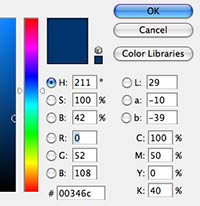
In Photoshop, it’s as simple as clicking on the foreground color in the Tools palette and looking at the CMYK values in the dialog box. Obviously, you can also get the RGB, LAB, HSB and Hex color values at the same time (See the screenshot at the upper right). Though I can’t state it with 100% certainty, the conversion of colors isn’t random. Adobe tries to keep the conversion based on the Pantone Color Bridge numbers. That being said, Adobe and Pantone don’t exactly have the best history of working closely with each other.
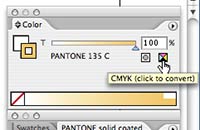
In Illustrator, you can easily check the CMYK values of the Pantone color by selecting the Pantone color in question and viewing the Color palette. Click on the little CMYK conversion icon and your CMYK values will be displayed right in the Color palette. Converting your colors FROM CMYK to Pantone can be quite easy in Photoshop as well.
Many times you design a logo or piece of artwork using process color, then find out that the client wants to use it in a two color job. If you designed the piece without Pantone colors in mind (shame on you!), you probably have no idea what Pantone color will match.
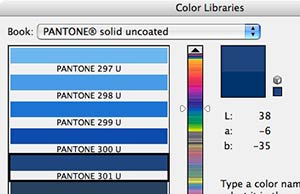
To find out what Pantone color will match your existing CMYK color, go back to Photoshop’s Tool palette and click on the foreground color to bring up the Color dialog box (as seen in the first screenshot above). Now click the “Color Libraries” button just below OK and Cancel. When the next dialog box comes up, select which Pantone Library you wish to convert to (I chose Pantone Solid Uncoated in the screenshot at the right). Photoshop will automatically jump to the closest Pantone color in the list. The match may not be 100% perfect, but it’s usually darn close!


5 COMMENTS
thank you so much 🙂
[…] use Photoshop/Illustrator, figure out how to convert a Pantone color to a CMYK value just like that here! It might not be the super-exact perfect match, but I can assure you that it’ll be pretty […]
In Illustrator, I prefer to use the “Recolor Artwork” option under Edit Color. (Pic Below) Some of the conversions won’t be off by much from the method described above, but it tends to make for “truer” conversions in the offset print world.
https://dl.dropboxusercontent.com/u/430620/Illy_Recolor_Artwork.jpg
ty!
This tip solved a head-scratching problem for me. Thank you!
Comments are closed.