Order your images when viewing with Quick Look
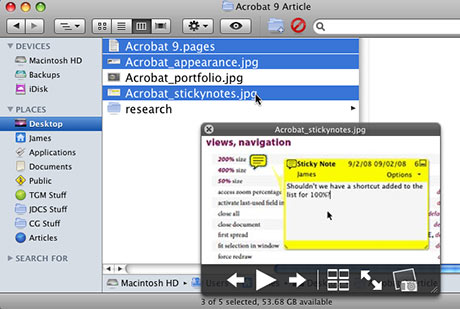 Reader RhymingDesigner sent me a great tip for arranging the order in which OSX displays files using Quick Look that I thought was pretty cool, so I thought I would share it with everyone. You can force Quick Look to display files in a desired order by Command + clicking on files in the Finder in the order you want to view them before hitting the space bar to launch Quick Look. Quick Look will then display the images in the order you clicked on them, rather than the order in which they appear in the Finder window. In the image above, I Command + clicked the stickynotes image first, then the other two files. So even though the Pages document is first in the folder listing, the stickynotes image appears first in Quick Look. Pretty cool!