
Paste Magazine has a really cool image Obamafication page for a bit of inaugural fun called ObamIconMe.
To have your image created in the style inspired by Shepard Fairey's iconic campaign poster, do the following:
Step 1:
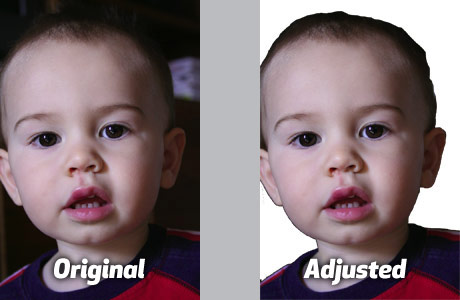
Start by choosing an image. Simple headshots work best. Next, drop out the background and save the file as a .png or .gif file with transparent background. As you can see in the image above, you don't have to be too terribly neat about it.
Step 2:
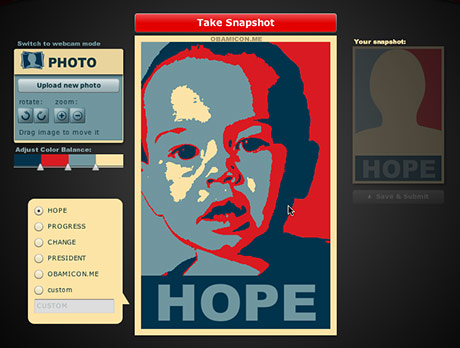
Upload your image on the ObamIconMe page. Once the image has uploaded, it will be displayed in the preview window at the center of the page. The image appears Obamified immediately with the default settings as seen above.
Step 3:
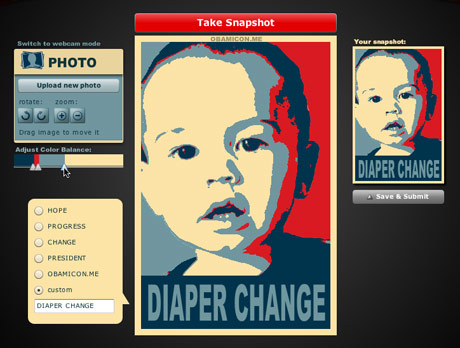
Adjust your image with the tools located to the left of the preview image. You may need to move the image around in the frame using the mouse cursor, and you can zoom or rotate the image with the buttons as well.
Adjust the colors using the sliders. As you can see in the image above, I adjusted them quite a bit to get less of the dark blue and red, and more of the light blue and cream color.
Don't forget to enter in a clever custom text title for the bottom of the poster. Characters appear in all caps only, so you'll have to think of something short & sweet.
Step 4:
Save your image by clicking the Save & Submit button. The file will be saved in .gif format at a rather small size (my completed image was 318x472 pixels). You can also choose to share the image with others on Facebook, Twitter or via email.
Step 5:
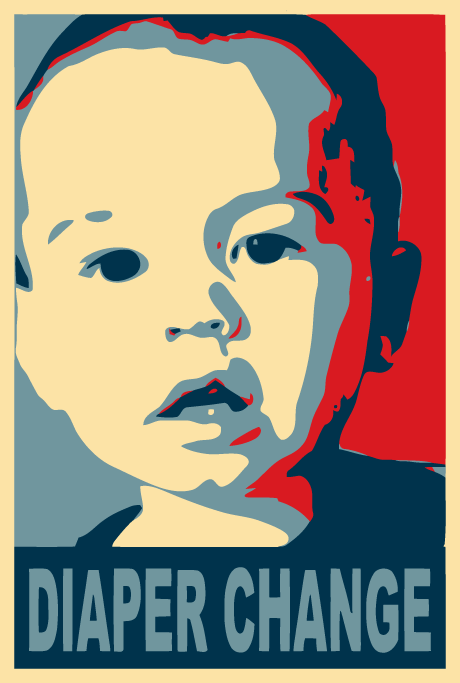
Because the image is so simple, and the amount of colors so small, it makes the perfect file for Adobe Illustrator's Live Trace feature. If you don't have Adobe Illustrator, or you can't seem to get decent results fiddling with the Live Trace settings, you can use Vector Magic online for a small fee.
That's it. The image above is actually an Adobe Illustrator .eps file which I can scale to any size for jaggy-free printing.





ha!
Wed, 01/21/2009 - 11:08 — Niki Brown | The Design O'Blog (not verified)Made me chuckle. Looks like its auto trace with a few colors in illustrator.
Post new comment